Adsk, your licensing sucks. (I am angry)

yea , but i bought my license from autodesk and not Amazon.

Oh wait, maybe its not such a great idea to host a licensing service on a single AWS region? maybe? just a thought ( i also know that even if you have multi region setup, doesnt mean the failover works, see parsec, they had it but it did not work)

2 Likes

Yes, but in the old days of on prem servers, the infrastructure cost was much higher, which would be reflected in your subscription price.

And while Amazon (nor anyone for that matter) is not safe from downtime, be glad that at least some of this runs on AWS. It’s likely more reliable than if the licensing code were all ADSK given that team’s record.

Not sure I understand “the infrastructure cost was much higher”. A tiny on-prem VM / container running FlexLM / AdLM / RLM is basically noise… Or are you talking about Autodesk’s costs for self hosting vs being on a public cloud provider?

At scale, a public cloud provider is typically more expensive than running your own infra. You go to the cloud to gain flexibility / scalability / speed of deployment / “opex vs capex” / Infrastructure As Code / leveraging middleware offered by the provider / disaster recovery / “I never want to deal with HVAC ever again” / … (all of which can definitely be counted as “costs” if you wanted to do all this yourself on prem) but in my experience, at the end of the day, the cloud provider bill is almost always higher than what you used to spend.

2 Likes

That was in the context of ADSK hosting a cloud license server rather than AWS. For better or worse, we live in a world of cloud-backed subscription licenses.

Whether permanent licenses, floating license keys are better is a separate debate. They all have pros and cons. And as much as you can worry about AWS, one can also worry about license servers from smaller software that might run on the wrong side of a war, a country that shuts of the Internet, etc. There are a multitude of failure modes to consider these days. Not the least a company just folding up - see Fisker, which bricked very expensive and very software dependent vehicles.

But on the flipside, subscription licenses in general are better for cash flow. So there are trade-offs. They may not matter to the tech folks that just deal with the pain points when it breaks.

Yes, a CPU in the cloud is more expensive than a CPU on-prem. But if you have to build all the fail-over multi-region infrastructure around it and including other aspects, your actual usage of the hardware is lower and you have significant overhead, making the TCO more expensive in many cases. Just by the nature that there many process and pieces that cannot be spread across multiple users.

That’s different from running a Flame instance on-prem and in-the cloud, and assuming you make constant daily use of the Flame instance. There the on-prem is more affordable, because there are no shared resources in play.

Ive been following this thread… I would like to join and say that no offline access to the software is poor. There should be a grace period or something in place. No reliable WiFi while supervising a production and doing test comps is a real concern.

4 Likes

Right, it would be nice to have a certain grace period. We don’t know for certain what the current design allows.

Here would be a basic requirements document:

  • On a currently unlicensed system, a named user license can be activated allocating it from the central ADSK license server marking it reserved with the system id (system A)
  • The allocation has a 48hr grace period (picked to be longer than most major outages). Flame is allowed to start if the last ping to the license server is no more than 48hrs in the past.
  • If more than 48hrs have elapsed, the user is prompted to restore Internet access.
  • Any other system starting Flame with the same user id will fail, as the license is marked as allocated to system A.
  • For systems which need to be air-gapped, there is a web interface where a challenge/response system can be exchanged to refresh the grace period without the system itself being online. For premium accounts and air gapped licenses, this grace period can be extended to 15 days to avoid overhead.
  • The same web interface can be hosted on a redundant cloud and be used during various outage scenarios to provide temporary extensions.
  • If a named user wants to switch systems, he first must release the previous reservation while being online. Then it can be allocated to a new system.
  • If a user is unable to release a previous reservation (no Internet access, crashed system), there is a web interface where the reservation can be force cancelled. This may only be done once per calendar month (same as BorisFX) to avoid abuse.
  • The system id should be such that is remains constant across network changes, OS re-installs, and reasonable hardware modifications. Where feasible, if Flame detects a system id mismatch, it can prompt the user if the system id needs to be migrated (with appropriate verification, and once per month limit).
  • For cases where licenses are temporarily assigned to workers (freelance day booking scenario), the license reservation has an automatic expiration at which time the local license server releases it, and more importantly the ADSK license server marks it as unallocated. Thus if the freelancers forgets to log out, the license will free itself up automatically at the end of the day. Those licenses have the shorter of the remaining time or 48hr grace period.
  • Similarly in the preferences there is an option to auto-release the license either on exit of Flame or a specific time of day. This can be helpful to users who frequently switch between two more more systems.
  • For post houses who allocate named user licenses to freelancers, there’s a mechanism where the license is owned by a more permanent user (which can share an email address with other similar licenses - assigned to an admin), while also having a temporary email address, which can be switched as part of license allocation by the admin. In that case the login on Flame should be via the temporary email for credentials, but count towards the named admin users in terms of usage. It improves admin usability, and automatically invalidates license with the freelancers email address, avoiding unauthorized use of known credentials.
  • Users accessing the ADSK licensing pages will be required to re-authenticate every 30 days. Within the 30days they can remain signed-in via cookies.
  • For corporate accounts a named user license can be re-assigned to a different email once every 90 days (employee turn-over), but not sooner to limit license sharing of named users.

Using an explicit release of a license avoids the scenario of the licenses server having to monitor the Flame process and then auto-releasing the license. License server monitoring app usage has a lot of race conditions and failure scenarios that lead to false positives and frustration.

Add as you see fit for use cases I overlooked…

One can dream…. :wink:

1 Like

JanGPT LOVE IT!

2 Likes

I’m fond of - “we purchased one license of sapphire plugins but my 24 node burn farm isn’t working”, or “we purchased ten licenses of neat video but I’m one of the twenty five artists who can’t load neat video in my batch group and my 24 node burn farm isn’t working”…

1 Like

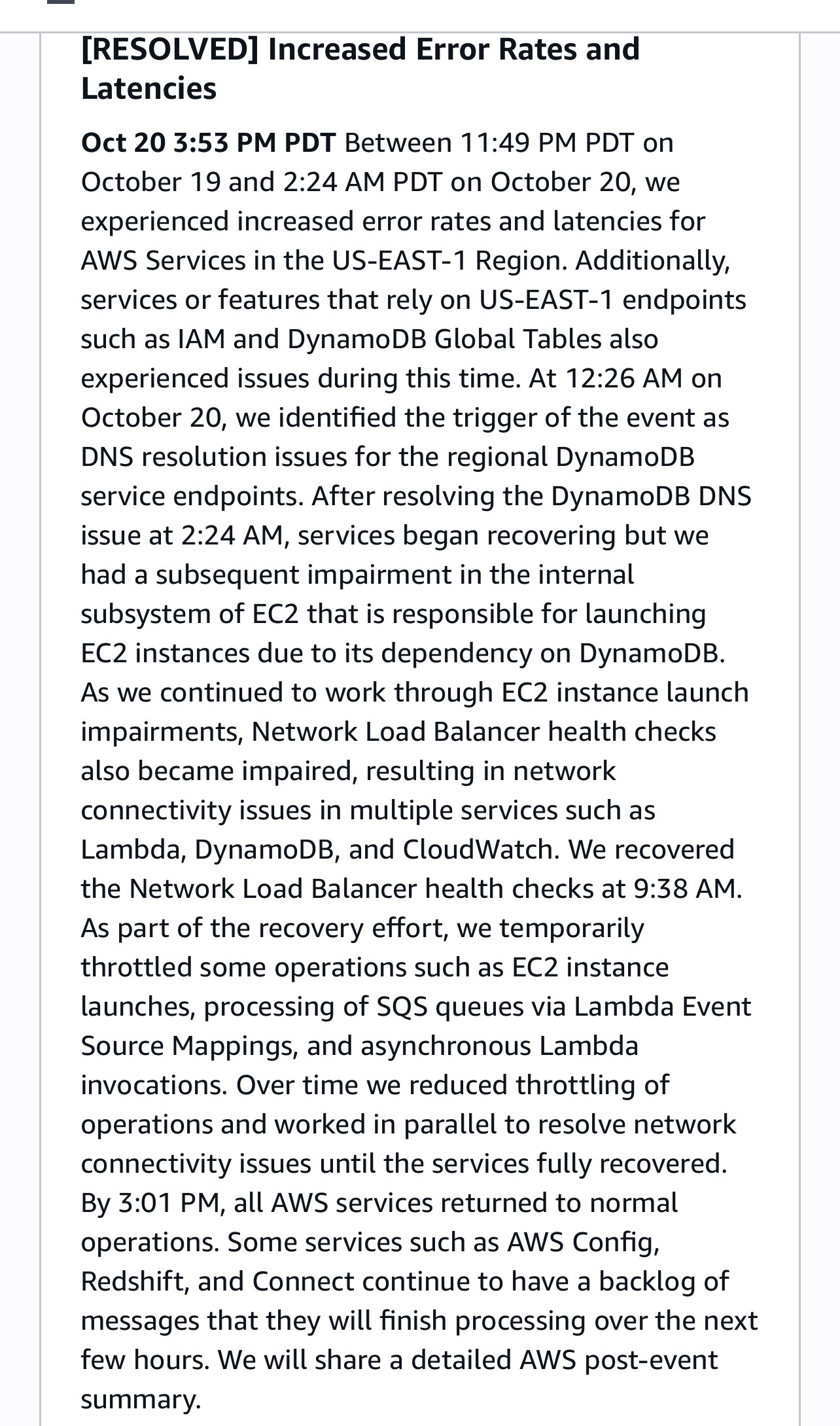
Preliminary root cause and summary. All back to normal at AWS, but clients may still catch up.

explains the global impact reason, and why it took a whole day to work through. Cascading networking errors.

Big phonebook went up in smoke so we had to rewrite phonebook from other phonebooks.

We are still here - we havent solved the phonebook but we are trying to replace everyone with AI.

Lol.

1 Like

Very much so…

An average human developer:

“We’re implementing a licensing service for a global company with customers in 144 countries. We’re using cloud services to store license information. I need a table that works well in all regions. Oh, they offer ‘global tables’, easy peasy”.

Writes solution. Single region outage (albeit a core region), long outage. Oops.

A senior human developer:

“We’re implementing [….] ok, we’ll need global data consistency, but regional performance, and redundancy. Ah, there are global tables available. But wait, they use an end point in a single region. That doesn’t work for high availability features. Maybe not a good idea.

Let’s use regular tables and use a data synchronization method to keep the tables synced between regions. After all users don’t jump regions all day long, but we do have to support that.”

Writes solution, takes a few extra days. The regional outage only affects users on the East Coast. Chuckles as he sees other services go down hard. Has to entertain himself with reading, since Snapchat and fun things are out to lunch. May do boring things and read cloud developer docs.

AI Copilot:

Prompted to build this solutions, goes ahead and utilizes the global tables feature because it recognizes ‘global’ from requirements section of prompt. But also having seen examples of synchronized tables: uses global tables for first table, and synchronized tables for another table, and regional tables for a third table but without synchronization. And the synchronization code logic also conveniently does a garbage collection of expired users.

(Based on good writing that AI code copilots have four common failure modes that mix and match features, and often make logic/scope/consistency errors.)

Hmm…. If you pay $6K for your annual license, you’re not pleased if the software company goes cheap, does not assign a senior developer to this team and then you have to explain clients sitting in the suite that due to a cloud infrastructure outage for data table which doesn’t store any project specific information, you cannot show them this important shot that airs tomorrow. And that they maybe call the guy next door that works with a Resolve dongle and is ok running Fusion, and working a few more extra hours because his tool is less efficient and less capable, but at least does run when it rains in the cloud.

1 Like

On the AWS outage, the root cause analysis is out, and a good summary over at The Pragmatic Engineer.

The good news: it wasn’t a human mistake

The bad news: it was a possibly predictable race condition in a service component that makes DNS changes to balance traffic for the massive DynamoDB install. It has so much traffic, that it can’t be handled by a single load balancer, but in fact requires a fleet of load balancers, and a service that constantly updates DNS routes between these load balancers.

And that service is so busy that it requires multiple workers. For reasons that are not fully disclosed, one of those workers was particularly slow and another particularly fast compared to averages that night, that it got so far head that a race condition zeroed out DNS entries when they shouldn’t have.

That was the first half. The second half was in EC2, when server leases started expiring because their status couldn’t be updated in the database, causing a phantom capacity issue which had to be managed. And during recovery there was so much congestion in the backlog that it collapsed. Which then also happened on the network manager once the instances finally were able to launch again. And had to be mitigated by manual throttles to get out of.

In the end that added up to 14hrs of outage.

This is a scale of system engineering and network traffic very few people ever work on. Pretty much most of are unique circumstances, and previously unseen things will happen every once in a while.

DynamoDB has a 99.99% SLA and meets it. But nothing ever is failure free. The biggest problem is still with how all the AWS customers dealt with it on their end.

2 Likes